Kogama Tower Climb Parkour
Reviews
Kogama Tower Climb Parkour delivers a straightforward precision-platforming loop: climb, fall, retry from a checkpoint, climb higher. Its strengths are responsive keyboard controls, readable visuals, and a difficulty curve that rewards observation over rushing. Checkpoints keep frustration manageable. The main limitation is scope—this is a single tower challenge rather than a broad platforming package. Players who enjoy skill-based obstacle courses will get the most from it; those seeking variety may find it narrow.
Description
Climbing a Tower of Moving Platforms
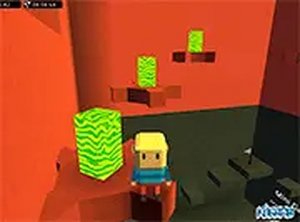
Kogama Tower Climb Parkour places you at the base of a tall tower and asks a single question: can you reach the top? The tower is divided into sections, each introducing new obstacles that demand sharper timing and more deliberate movement than the last. Early platforms are forgiving; higher sections punish hesitation. Because the game is played in a desktop browser with an optional full-screen mode, the entire challenge stays in front of you without downloads or installations.
Controls and Route Planning
Movement uses standard keyboard inputs—arrow keys or WASD—with the spacebar for jumping. The mouse lets you look around and survey what lies ahead, which matters more than it first appears. Acid blocks and moving platforms are the main hazards, and both follow patterns. Watching a platform complete one full cycle before you commit to a jump often saves a retry. The controls are responsive, so failures usually trace back to timing rather than input lag.
Checkpoints and Rising Difficulty
Falling does not send you back to the bottom. Checkpoints are placed at section boundaries, so a mistake costs you the current stretch rather than the whole climb. This structure encourages experimentation: you can attempt a risky jump, learn from the fall, and retry from the last checkpoint. Difficulty scales with height, shifting the game from quick reflexes toward patience and pattern recognition. Each fresh attempt starts clean, reinforcing the idea that technique improves through repetition.
Who This Suits
Players who enjoy precision platforming—where a single mistimed jump ends an attempt—will find the format familiar and focused. The vibrant visuals and smooth controls keep the experience readable, which helps when you are tracking multiple moving parts at once. Those who prefer forgiving, story-driven games may find the emphasis on repeated attempts less appealing. For everyone else, the loop is simple: observe, time the jump, climb higher.







Editorial Notes