Tile Summation 2048 Puzzle
Reviews
Tile Summation 2048 Puzzle strips the genre to its essentials: slide, merge, repeat. The lack of timers makes it welcoming for casual play, while the random tile spawns and grid management give strategists something to refine. The color-coded board and adjustable animation speed show thoughtful design for long sessions. Its main limitation is a narrow scope—there are no extra modes or progression beyond score tracking—but for players who enjoy logic puzzles, that focus is the appeal.
Description
The Merge Mechanic
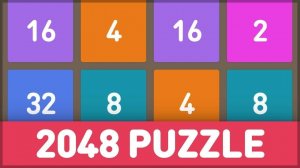
Every move starts with a swipe or arrow key press. All numbered tiles slide as far as possible in that direction. When two tiles with the same value collide, they combine into one tile showing double the number—two 2s become a 4, two 4s become an 8, and so on. After each slide, a new tile appears in a random empty cell, usually a 2 or 4. The board fills gradually, and the run ends when no empty cells remain and no adjacent tiles share a value.
Planning Around Randomness
Because new tiles appear unpredictably, no single sequence of moves guarantees success. Experienced players often keep their largest tile anchored in one corner, which limits how much the board can fragment. Chaining multiple merges in one move clears space and pushes the highest value upward faster. The tension comes from balancing immediate merges against keeping the grid organized for the next few moves. There is no time limit, so each decision can be weighed carefully.
Interface and Feedback
The board uses color-coded tiles, so scanning for matching values takes little effort. Animation speed is adjustable, letting you speed through routine slides or slow down when the grid gets crowded. Sound effects can be toggled on or off independently. A built-in statistics tracker records best scores and recent results, giving clear feedback on whether your corner strategy is actually improving your outcomes.
Who It Suits
Controls are limited to arrow keys or swipe gestures, and the rules need no tutorial. That makes the game approachable for quick breaks, while the randomness and grid management give experienced puzzle players something to optimize. The absence of timers or pressure means sessions can last as long as you want, and the optional audio and adjustable animation help avoid fatigue during extended play.






Editorial Notes