Contraption Course Creator
Puzzle Physics Creative Building Strategy Casual
Contraption Course Creator
40
Developer: Energy Wanderer Games
Updated: 2026-07-21

Reviews

Contraption Course Creator turns simple physics into an engaging puzzle of cause and effect. The joy comes from watching your stickman tumble through a course you designed, with each collision adding to your coin total. The building tools are easy to use, and the gradual unlocking of new parts keeps the experience fresh. It is a relaxing yet mentally stimulating game that appeals to both casual players and those who love engineering chaotic setups. The lack of strict goals means you can play at your own pace, making it a great choice for unwinding.

Description

Core Concept: Cause and Effect

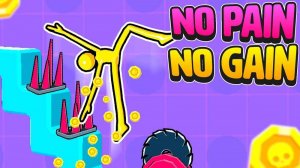
Contraption Course Creator places players in the role of a designer who sets up a series of obstacles for an autonomous stickman. The stickman moves forward on its own, and the player's task is to arrange items such as rotating platforms, springs, and swinging blocks to alter its path. Every time the stickman makes contact with an object, it generates in-game currency. The goal is to create a sequence that keeps the stickman in motion for as long as possible, avoiding a quick fall to the ground. This design loop rewards creativity and observation, as each new arrangement produces a different outcome.

Building Your Obstacle Layout

Players begin with a simple ledge and a stickman ready to step off. Using a selection of tools, they can place items like staircases, spinning wheels, and angled ramps in the stickman's path. The game provides a zoomable view so builders can position each element with care. As coins accumulate, new items become available, expanding the range of possible constructions. The physics engine handles the stickman's reactions realistically, making each course a unique experiment in momentum and collision.

Earning and Unlocking

Coins are the primary reward in Contraption Course Creator. They are earned each time the stickman hits an obstacle, with longer chains of collisions yielding more currency. These coins can be spent on unlocking additional building components, such as larger blocks, more complex spinning mechanisms, or items that alter the stickman's trajectory. The progression system encourages players to revisit their designs and try new combinations to increase their earnings. There is no set endpoint, so builders can continue refining their courses indefinitely.

Creative Experimentation

The sandbox nature of Contraption Course Creator means there is no single correct solution. Players are free to test different placements and angles to see how the stickman responds. Some setups might trap the stickman in a loop, while others send it bouncing across the screen. The game does not penalize failure, so builders can try wild ideas without consequence. This open-ended approach makes each session feel fresh, as the physics interactions often produce surprising results that are both amusing and instructive.

Compatibility

✅ This game supports:
- Desktop browsers (Chrome, Edge, Safari)
- Mobile browsers (Chrome on Android, Safari on iOS)
❌ Does NOT support: - Internet Explorer - Very old browser versions
👉 Try refreshing or updating your browser

Faq

Can I play Contraption Course Creator on mobile devices?
Contraption Course Creator is primarily designed for desktop browsers, though some versions may be available on tablets. Check the official game page or app store listing for specific platform support. The controls rely on precise placement, which is easier with a mouse or touch input.
Is there a limit to how many obstacles I can place in a single course?
The game does not impose a strict limit on obstacle count, but performance may vary depending on your device. Extremely large or complex setups could cause slowdowns. It is best to build manageable courses that keep the physics simulation running smoothly.
Do I need to complete levels or challenges to progress?
Contraption Course Creator does not have predefined levels or challenges. It is a sandbox experience where you build freely. Progression comes from earning coins through collisions and unlocking new items, which you can use to enhance your courses.
Can I save and share my obstacle courses with other players?
The game may include a save feature that allows you to store your designs locally. Sharing options depend on the platform. Some versions offer export codes or links, while others keep courses private. Check the in-game menu for sharing capabilities.
What happens if the stickman falls off the course immediately?
If the stickman hits the ground quickly, you earn few or no coins from that attempt. You can reset the stickman and adjust your obstacle placement to create a longer path. The game encourages iterative design to maximize collisions and rewards.
Are there any in-app purchases or ads in Contraption Course Creator?
Some versions of Contraption Course Creator may include optional ads or in-app purchases for cosmetic items or coin boosts. The core gameplay remains free to enjoy without spending money. Check the game's store page for specific monetization details.

Comments

0 comments
U
User
Loading comments...