Skyward Climb Runner
Reviews
Skyward Climb Runner leans on precise movement rather than randomness: jumping, dashing, and flying all punish mistimed inputs, and progress comes from practice. The animated difficulty faces make stage selection transparent, which helps newcomers without stripping challenge from veterans. The level editor adds longevity by letting players build and share courses, or design stages around a single mechanic they want to improve. Its appeal is narrow but honest: players who enjoy repetition, rhythm, and self-directed improvement will get the most from it.
Description
Movement That Demands Timing
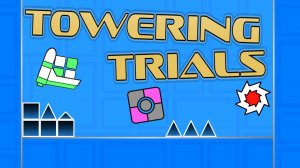
In Skyward Climb Runner, the character moves upward through a sequence of platforms and barriers. Three actions drive every stage: jumping to reach higher ledges, dashing across gaps quickly, and flying through open sections. Each move is timing-sensitive. A jump released too late or a dash triggered too early sends the character falling back down, so progress depends on reading the spacing of a stage and matching your inputs to it. There are no random elements or unfair mechanics; the game attributes progression to repeated practice and learning rather than luck.
Reading Difficulty Before You Commit
Stages are prebuilt and can be tackled in any order, so you are not locked into a fixed sequence. To help you pick a starting point, each level displays an animated facial expression as a complexity indicator. A calm face marks an easier stage, while a more intense expression signals greater difficulty. This lets newcomers choose gentle stages while experienced players head straight for the harder ones, and it keeps stage selection itself a meaningful decision rather than a guess.
Building and Sharing Stages
The level editor extends the game beyond the prebuilt courses. You select from various tile types, including blocks and obstacles, and place them by clicking or dragging. Keyboard shortcuts handle precise adjustments such as moving tiles or rotating blocks. Finished creations can be saved and shared, which supports a community of custom content and gives the game a second purpose: designing stages that focus on the specific mechanics you want to improve.
Visual Clarity as a Design Rule
Every stage communicates the player's position and upcoming obstacles through clear visual feedback. Color-coded tiles and distinct outlines mark interactive elements, so you always know what can be touched or used. The animated difficulty faces follow the same principle. This clarity reduces frustration and keeps attention on skill development, which matters in a game where a single mistimed action costs vertical progress.



Editorial Notes