MatchCraft 3D - Tile Puzzle Challenge
Reviews
MatchCraft 3D focuses on a single satisfying loop: find three identical tiles on a layered 3D board and clear them. The lack of timers, scores, and penalties makes it unusually approachable, while varied tile shapes and overlapping layouts add enough planning to keep the mind engaged. Daily and extra modes offer different session lengths. The soft visuals and minimal audio support relaxation. It is best for casual players, families, and older adults who want a stress-free puzzle without competitive pressure.
Description
The Core Matching Loop
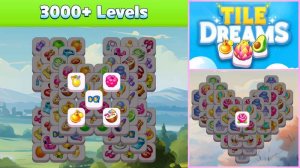
MatchCraft 3D builds its gameplay around a single, clear action: find three identical tiles on a three-dimensional board and tap them to remove them. Each tile carries a distinct pattern or symbol, and as the board fills with layers, remembering where matching tiles sit becomes the main task. There is no timer or pressure, so players can study the layout and plan each tap. Removing a set of three often reveals tiles underneath, creating a chain of discoveries that keeps the loop engaging over longer sessions.
Level Design and Spatial Variety
Puzzle layouts vary widely in how tiles are arranged. Early stages keep things simple with fewer tiles and open arrangements. Later puzzles stack tiles in overlapping patterns that demand more planning, and the game changes tile shapes and board configurations so that layouts do not feel repetitive. Players must decide which matches to clear first, since a poor order can block access to needed tiles. That decision-making gives the casual format enough depth to hold attention.
Visual and Audio Atmosphere
Bright, colorful tiles are rendered in three dimensions, giving the board a tactile presence. Smooth animations play with each match, offering a small sense of completion without being distracting. Soft background music and minimal sound effects—gentle clicks and chimes—reinforce a calming tone. The overall presentation supports focus rather than excitement, which suits winding down after a busy day.
Daily Puzzles and Extra Mode
Beyond the main progression, MatchCraft 3D includes a daily puzzle that refreshes each day, providing a short, low-pressure challenge for a quick mental break. An extra mode offers harder configurations with more tiles and tighter layouts for players who want a bit more intensity. Neither mode adds timers or penalties, so the stress-free nature remains intact. Players can choose a brief daily session or a longer extra-mode run depending on their available time.
Accessibility and Pace
The game is designed for a wide range of ages and skill levels. Controls are simple taps or clicks, and the interface is clean with no confusing menus. Because there are no timers, scores, or competitive elements, players never feel rushed. This makes it suitable for older adults looking to maintain cognitive sharpness and for younger children learning pattern recognition. The adjustable pace lets each person play comfortably, whether clearing tiles quickly or planning every move.





Editorial Notes