Circular Arena Disk Dodge: Action Reflex Game
Reviews
Circular Arena Disk Dodge offers a pure skill challenge with no luck involved. The 3D graphics provide a clear view of the arena, and the progressive difficulty keeps each round engaging. Controls are simple, making it easy to pick up but hard to master. The game is ideal for quick gaming sessions and rewards practice and timing. A great choice for players who enjoy reflex-based action games.
Description
Game Introduction
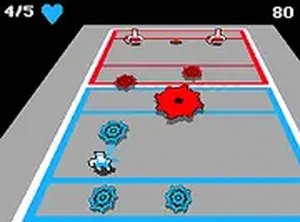
Circular Arena Disk Dodge is an action arcade game that challenges players to avoid incoming spinning disks in a 3D environment. The core objective is simple: survive as long as possible by dodging projectiles, collecting disks that land nearby, and throwing them back at opponents. Set in a circular arena, the game emphasizes hand-eye coordination and strategic movement. As you progress, more enemies appear and their throwing speed increases, creating a pure test of skill with no random elements. Each session offers a fresh test of reflexes and decision-making under pressure, making it ideal for players who enjoy quick, skill-driven gameplay. The game is free to play directly in your browser without downloads, and each round feels different, rewarding improved survival time.
How to Play
Players typically use keyboard arrow keys or mouse to move their character around the arena. The key is to watch incoming disks carefully and dodge them by moving left, right, forward, or backward. When a disk lands near you, move over it to pick it up. Once you have a disk, aim at an enemy and click or press a key to throw it. Each successful hit removes an enemy, but missing leaves you open to attack. The game ends if you are hit by a disk. Playing in full screen mode helps you see the entire arena clearly, and practicing timing and positioning is essential for survival.
Game Features
Fast-paced 3D graphics with a clear arena view. Simple one-button controls for movement and throwing. Progressive difficulty that keeps the action engaging. Free to play directly in your browser without downloads. Full screen mode for an immersive experience. Quick rounds that fit into short gaming sessions. The game offers a pure skill challenge with no luck involved, and each round feels different, improving your survival time is rewarding.
Tips for Success
Practice regularly to improve your reflexes and timing. Focus on positioning yourself away from clusters of enemies to give yourself more reaction time. Learn to anticipate disk trajectories by watching enemy patterns. When you pick up a disk, aim carefully before throwing to avoid wasting your chance. Stay calm under pressure, as panicking can lead to mistakes. Use full screen mode for better visibility. Finally, take breaks to avoid fatigue, as this game demands sustained concentration.






Comments
0 comments