Arcade Basketball Sports Game
Reviews
Head Sport Basketball offers a refreshing take on arcade sports. The ability to customize characters, playgrounds, and weather adds variety to each match. AI opponents adjust to your skill level, making it enjoyable for both beginners and experienced players. The game is easy to learn but offers enough challenge to keep you coming back. It is a safe, non-violent option for family game time.
About This Game
Game Introduction
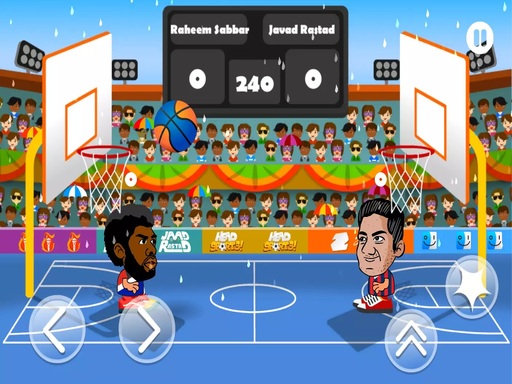
Head Sport Basketball Online Arcade Game is a simplified and enjoyable basketball experience where players use their character's head or foot to kick the ball into the opponent's hoop. Before each game, you can choose your character and customize its appearance, as well as other features like the playground, weather conditions, AI difficulty, and match duration. The goal is simple: outscore your opponent by using precise kicks and strategic movement. This game is designed for all ages, offering a lighthearted and competitive experience without any violent or inappropriate content.
How to Play
To play Head Sport Basketball, use the four on-screen buttons to control your character. Two buttons are for moving left and right, one is for jumping, and the last is for kicking the ball with your head or foot. Move your character to position yourself near the ball, then jump and kick to send it toward the opponent's basket. The AI opponent will try to block and score as well. Adjust the difficulty and match duration in the settings to suit your skill level. The player with the most points at the end wins.
Game Features
Customizable characters let you change your look. Different playgrounds and weather conditions change the match atmosphere. AI difficulty settings range from easy to hard. Match duration can be set to short or long games.
Tips for Success
Practice your timing for kicks and jumps to aim accurately. Move quickly to get to the ball before your opponent. Use the settings to start with easier difficulty and shorter matches to learn the controls. Try different character customizations to find what feels best. Watch the AI opponent's movements to anticipate their actions and improve your defense.